Saturday, 30 November 2013

Top 5 Blogger Widgets For Christmas

0 comments
Merry Christmas To All Visitors Of CS Tricks. Today is first day of december and we all started to prepare for christmas shopping . Christmas is special for decorations and for eating cakes so here is the good news for blog owners because now you can decorate your blog with some awesome widgets of christmas like Jingle bell, flying santa and flashing lights. So let's do something new in this year christmas and start decorating your website and blog with some cool widgets.

Find below given Top 5 javascripts code for christmas widgets and use it inside your blog. You don't have to be script expert for using this codes, you just have to copy below given javascripts and put it in Html/javascript gadget of your website and blog.

How To Add :
  • Goto LAYOUT of your blogger blog.
  •  Select HTML/JAVASCRIPT .
  • Finally copy scripts from below and paste it.

Top 5 Christmas widgets are :


1) Flashing Lights On Both Sides ==??


2) Background Music ( Jingle Bell ) ==??


3) Flashing Lights On Top ==??


4) Animated Santa On Top Left Side ==??


5) Christmas Bells On Both Top Corners ==??


Hope you loved all 5 widgets, will add more after geetting more designs and ideas. Thanks for visiting Us.

Comments will be Appreciated !!


Monday, 4 November 2013

How To Add Live Chatbox Like Facebook In Your Website/Blog

0 comments
Wanna chat with your website visitors to assist them ?? then you are at right place to use it live in your website. We all love to chat online and most of the social networking websites got this feature to attract its visitors and I am sure after applying this trick in your website, lot of visitors will love it and they will visit your blog regularly.

So, if you wish to add live chat feature in your website then OFFERCHAT is providing you this feature free of cost and their setup is also too easy to follow.


How to Integrate Offerchat In Your Website :


  • At first visit OFFERCHAT official website by following this Link .
  • Register your account and then goto Add Website section and add link of your website.


  • After adding your website link, you will be redirected to a new page where you have to set greeting text, colour and position of the chat.

  • Set everything as per your choice.
  • Now finally Offerchat will provide you a html code which you have to put before closing </head> tag.

Bravo !! Finally, you have successfully installed live chat in your website.


Note : We Added Same Chat Box in Our Website For Demo View, Just Look At Right Bottom Side And Start Chatting With Admin.

Now whenever any visitor will visit your website, they can see live chat box in your website and whatever they typed in chat box, you will receive that message in your offerchat dashboard.

Apart from these features, you can add new agent also, so that if you are offline then your agent will do your task.

By using this chat feature, you can track your website visitors also. But unfortunately you can only use it for 60 days. You have to upgrade if you wanna use it for more time.

Hope you loved this awesome chat feature for your website. Comment below for any type of queries.


Monday, 29 July 2013

How To Import Blogger To Wordpress Without Loosing SEO

0 comments
For many geeks, Blogger is the first website tool they ever use because it's totally free to use and we can avail unlimited image hosting too without any cost . But apart from advantages it got lot of disadvantages too like your files and content will not be in your control.

In Blogger, there is one advantage where you will not have the headache of buying or maintaining hosting. But in terms of security and hacking protection, Blogger is best amongst all because it is a Google Product :D

Still I prefer Blogger because its very easy to use and its secure too, that's why I kept this website still under Blogger.

Move Your Blogger Blog To Wordpress :

If you are not using custom domain for your blogger blog, then first you must setup your own custom domain before proceeding for below steps. It will take around 2-3 days for before all indexed posts to get transitioned from .blogspot URL to your own custom URL. Once your .blogspot URL got disappear from search results, then proceed to the next step to move your Blogger to wordpress . 

Purchase Webhosting :

First of all purchase a good hosting according to your needs. While selecting a good hosting, analyze it properly before buying because most of the time web hosts shows you false and they does not fulfill your expectations later.

Redirect Domain To Webhosting :

Once you successfully followed above steps, now you have your own hosting and custom domain. Its time to redirect your domain to your hosting. Now goto domain control panel and make the necessary changes according to instruction provided by your host. It will take sometime before the changes are applied correctly. Keep checking your domain status in either it redirects or not in every minute. Your visitors may also suffer some error temporarily so its better to put some announcement notice in your blog. Once domain is redirected, goto your hosting control panel and install WORDPRESS under ROOT directory.

After installing Wordpress, follow below steps correctly :

  • Log-in to your Wordpress blog ( yourdomain.com/wp-login.php ) and delete default post which is created during installation. 
  • Finally click on Tools and then Import.


  • In the next screen, select Blogger and install the import plugin if prompted and finally click on Authorize to run the importing process.


  • Now Google will ask you to grant the access once you provide your login credentials. Its better to stay signed to your blogger account also in next tab of same browser before you start the import process. Now you will see the list of your blogs after allowing it. Finally click on the import button and  set authors once import is completed.


Now you have successfully imported your Blogger blog to Wordpress.

  • Now you have to change the permalink structure to make it similar to blogger permalink and to keep your SEO alive . To change the permalink structure, goto Settings and then select permalinks. In the appeared window select custom structure and paste the below link structure in the box.
/%year%/%monthnum%/%postname%.html


  • Finally save the changes.
  • Now permalink structure has been made similar to blogger , but still some error may occur. So Download fixlinks.php file from below link and upload it too root directory of your Wordpress installation ( EX : yourdomain.com/fixlinks.php ) and open it in your browser and press enter. Now you will see a message saying links fixed.


Bravo !! Now you have successfully migrated your Blogger Blog to Wordpress without losing your SEO and single visitors.

Hope you liked this tutorial, feel free to comment below for any queries. CS Tricks will always happy to help our visitors :)

Must Read : Top 10 Free Mobile Recharge & Online Earning Websites 


Please Recommend Us On Google     


Sunday, 21 July 2013

How To Create Android Application For Your Website

0 comments
Nowadays, Android is one of the most popular operating system of smartphones and everyone loves Android applications. Most of you are owned their own website or blog, so how is the idea of creating own application for your website. 

In this tutorial I am going to guide you about how to create your own Android application for your own website.

Let's Begin This Superb Tutorial !!

How To Create Android Application :

  • Firstly, goto AppsGeyser Website and register a free account.

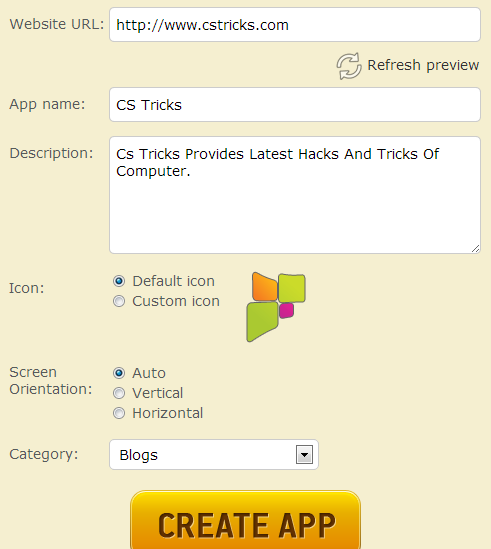
  • Fill all columns correctly and finally click on create app.
  • Now you will see a signup form. Register using that signup form.
  • After registration, you will see a dashboard; from there you can get the download link to share your android application with your audience.
  • Now you are successfully created your own Android application for your website.

?? Download our website's Android Application from below link for demo ??


?? OR Scan this QR Code ??


Please Recommend Us On Google     


Monday, 17 December 2012

How To Disable Copy Paste In Blogger

0 comments
Most of the visitors are asking me to post about blogger tricks. So here I tried to fulfill their request. This is my first post for blogger. This post is very useful to keep your post data copyrighted because nowadays lot of newbie bloggers are just copying and posting your valuable post.

Usually how do we copy a content from a docs ? We would select the content we need to copy down and use short cut keys or Right click and Select copy. How about disable selecting text itself , then readers couldn't use shortcuts and even though they couldn't copy down using right click options.
So i recommend this method to bloggers who wish to protect their contents from content thieves.


FOLLOW THE STEPS CORRECTLY :

1) Goto Layout and Click on Add Gadget.

2) Choose HTML/Javascript from Gadget list.

3) Now copy below given code and paste it in your html/javascript gadget box & save it.